
Users and Roles
Workflows and document types you can access depend on your user permissions.
User permissions can be set individually by editing the users’ permissions or by creating a permission group and assigning a user to the permission group.
Editing permissions at the individual user level:

Editing permissions through a permission group:
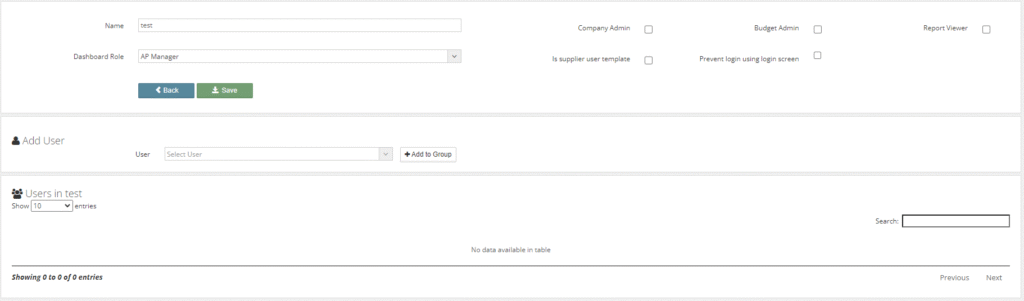
Within a permissions group, you can edit the users/permissions group name (email address).
User profile:

Permission group profile:

Various company roles are also included in this section which can be enabled for a user/permission group.
These roles include Company Admin and Report Viewer, roles are set for the whole system.
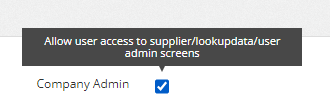
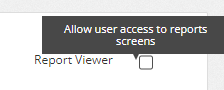
A company admin can hover over the permission roles to get a brief description of that role.
Roles:
- Company admin: A user will have access to all company data contained within the supplier, lookup data and company admin sections within Kefron.
- Report Viewer: A user will have access to all reports and report history contained within the report section in Kefron.
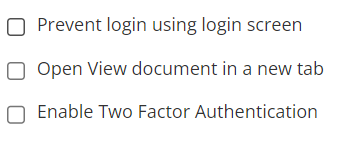
Additional User Settings:
- Prevent login user login screen: to be enabled if clients want to login via single sign-on only.
- Open View document on a new tab: when enabled a document will open in a new tab each time the view button is clicked.
- Enable Two Factor Authentication: to be enabled if a company wishes to have all users use 2-factor authentication when logging into Kefron.
Dashboard Role:
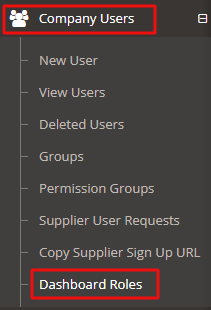
The permissions for these roles can be managed by a company admin through company users and dashboard roles.
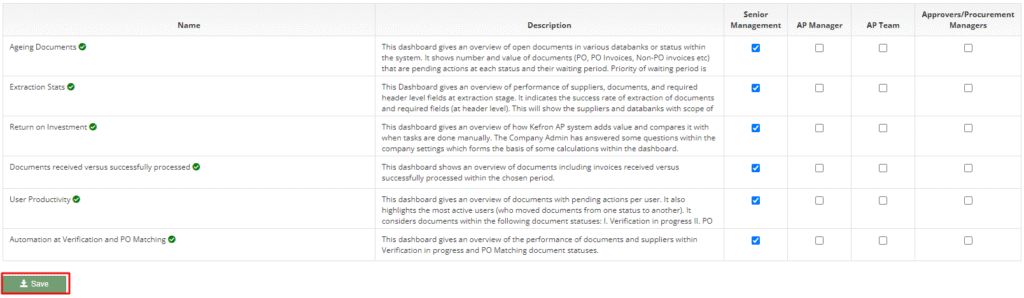
A company admin will amend the dashboard permissions to suit their company and save, they can then assign the correct dashboard role to the user or permission group.